TWAP- Price Band
Time Weighted Average Price (TWAP) Price Band strategy is an enhanced accumulation approach. It works like the TWAP Order Slicing method but adds an extra rule: trades are executed only when the asset’s Last Traded Price stays within a price range defined by the user.
When To Use?
This strategy is useful when placing a large order that you want to execute in smaller parts over time. Like TWAP Order Slicing, the main order is divided into multiple child orders to reduce market impact. Additionally, by setting an upper and lower price limit, you can avoid execution during unfavorable price movements and protect yourself from sudden market fluctuations.

What are the inputs required?
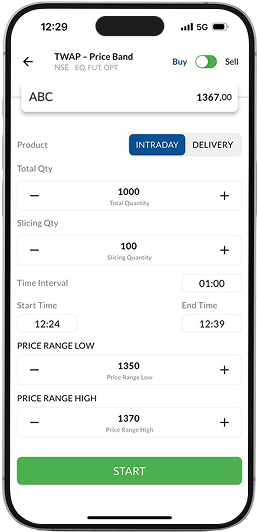
Stock Name
This is the stock you want to buy or sell in Equity or F&O Segment
Total Quantity
This is the total quantity you want to buy / sell
Slicing Quantity
This is the quantity which will be placed periodically till the algorithm stops
Start Time
This is the time when the algorithm will
start executing
Price Range Low
This is the lower price limit for order execution










Action
This is the action you want to take (Buy / Sell)
Product Type
In Cash: Select from Intraday / Delivery
In F&O: Select from Intraday / Normal
Time Interval
This is the time difference you want to keep between two slices
End Time
This is the time when the algorithm will stop, even if the total quantity is not met
Price Range High
This is the upper price limit for order execution
What are the inputs required?
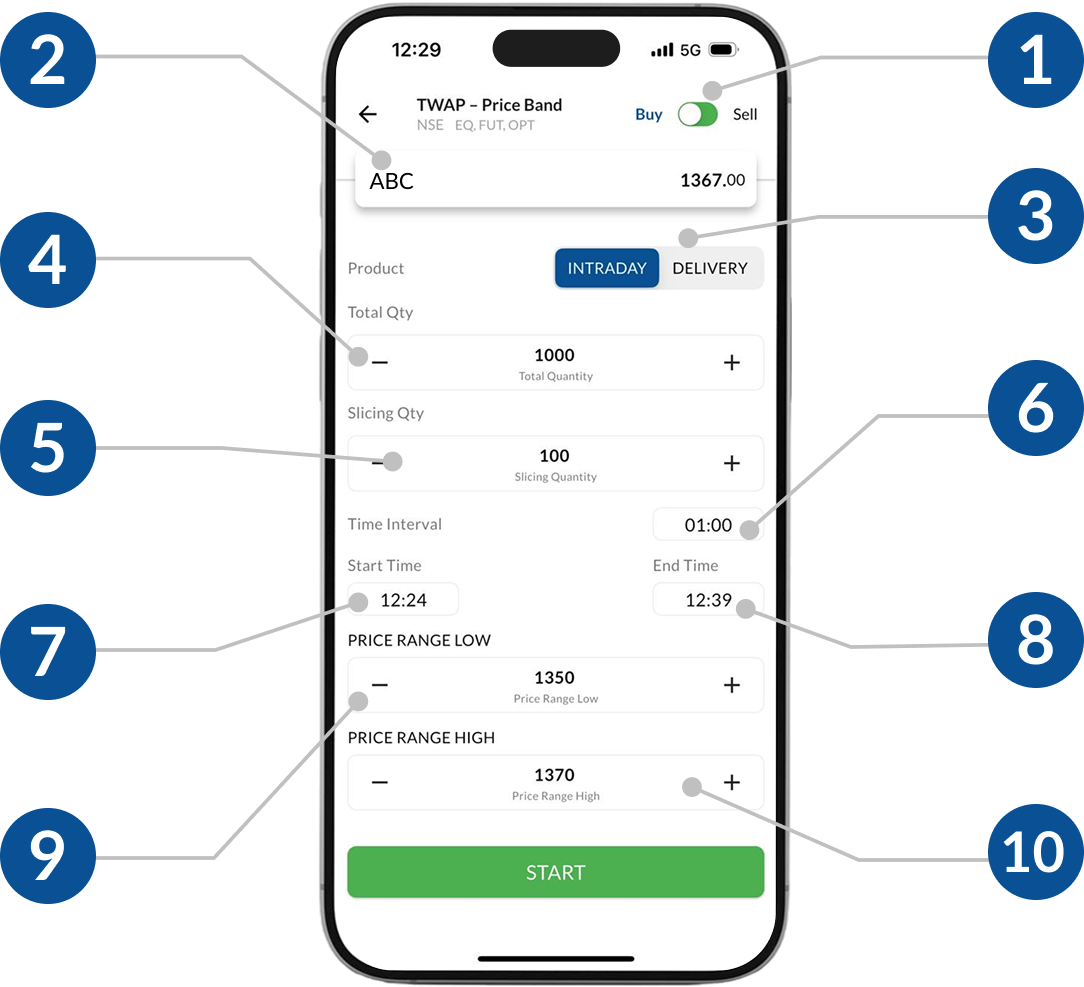
1 Action
This is the action you want to take (Buy / Sell)
2Stock Name
This is the stock you want to buy or sell in Equity or F&O Segment
3 Product Type
In Cash: Select from Intraday/ Delivery
In F&O: Select from Intraday/ Normal
4 Total Quantity
This is the total quantity you want to buy/ sell
5 Slicing Quantity
This is the quantity that will be placed once the averaging conditions are met
6 Time Interval
This is the time difference you want to keep between two slices
7 Start Time
This is the time when the algorithm will start executing
8End Time
This is the time when the algorithm will stop, even if the total quantity is not met
9Price Range Low
This is the lower price limit for order execution
10Price Range High
This is the upper price limit for order execution
How does it work?
After the Algorithm is triggered it works in the following way:
As soon as the Start Time is reached, the algo checks if the Last Traded Price matches the price range specified by user
- If yes, then it places the order equal to the Slicing Quantity
- If not, then it waits for a time equal to Time Interval to check again
The Algorithm keeps on checking the parameters after every Time Interval and sends order slices accordingly
As soon as the Total Quantity is met or End Time is reached, the Algorithm stops
When not to use?
This Algorithm is not suggested for illiquid stocks (i.e. high bid-ask spread or low volume traded). It is also not recommended for stocks having high volatility.