Averaging Scalper
Averaging Scalper Algo is a trading strategy that involves quick buying and selling of the same stock or contract based on predefined entry and exit rules. The goal is to capture small price movements by entering and exiting positions multiple times during the trading day. A scalper makes frequent trades in a single stock or contract to take advantage of short-term price movements and intraday momentum.
Averaging Scalper Algo
Ever felt like you missed a perfect trade opportunity? In scalping, timing is critical—and missing even one move can affect performance.
That’s where the Scalping Algo helps. It automatically executes trades based on set rules, ensuring you don’t miss opportunities. You can also track all executed trades easily with a single click.
Available For :

Cash (NSE)

F&0 (NSE)

What are the inputs required?
Stock Name
This is the stock you want to buy or sell in Equity or F&O Segment
Max Open Quantity
This is the max open quantity you want while scalping At no point, your open quantity will exceed/breach max open position
Averaging Entry Difference
This is the min drop in price wrt last reference price to trigger buy order
Start Price
Select Start price as At Market / Custom At Market: the first order is executed on market immediately
Custom: the first order is sent when the start price is reached
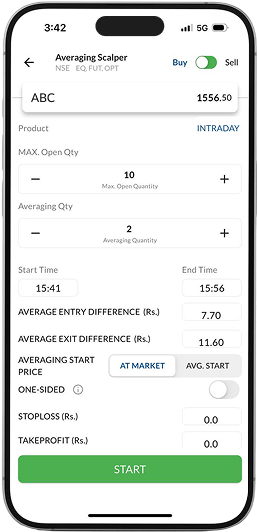










Action
This is the action you want to take (Buy / Sell)
Product Type
Select from Intraday/ Normal
Averaging Quantity
This is the quantity that will be placed once the averaging conditions are met
End Time
This is the time when the algorithm will stop, even if the total quantity is not met
Start Time
This is the time when the algorithm will start executing
Take Profit/ Exit Difference
This is the min rise in price wrt last reference price to trigger sell orders
What are the inputs required?
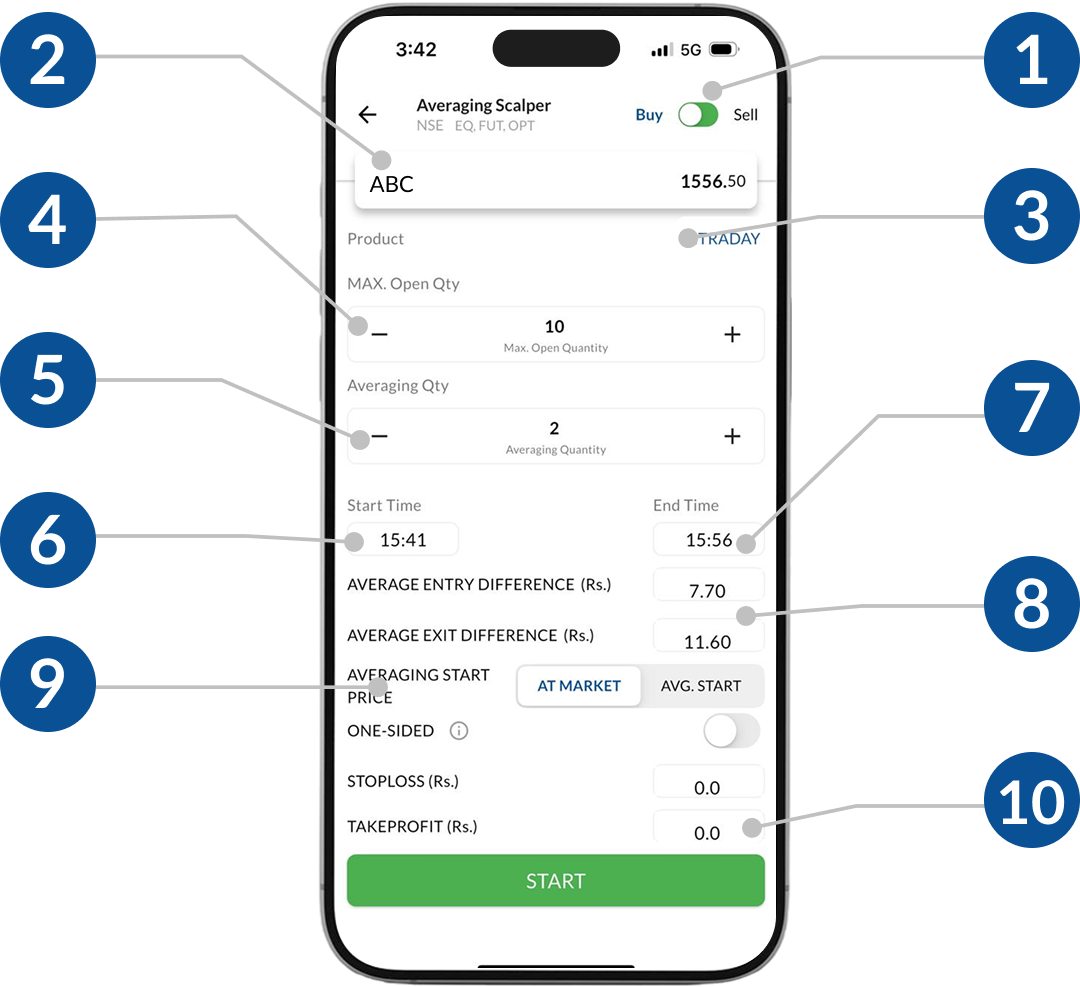
1 Action
This is the action you want to take (Buy / Sell)
2Stock Name
This is the stock you want to buy or sell in Equity or F&O Segment
3 Product Type
Select from Intraday/ Normal
4 Max Open Quantity
This is the max open quantity you want while scalping At no point, your open quantity will exceed/breach max open position
5 Averaging Quantity
This is the quantity which will be placed periodically till the algorithm stops
6 Start Time
This is the time when the algorithm will start executing
7 End Time
This is the time when the algorithm will stop, even if the total quantity is not met
8Average Entry Difference
This is the min drop/ rise in price wrt Averaging reference price to trigger orders
9Direction
This is the desired direction in which you want the market to move
10Start Price
Select Start price as At Market / Custom At Market: the first order is executed on market immediately
Custom: the first order is sent when the start price is reached
11Take Profit/ Exit Difference
This is the min rise in price wrt last reference price to trigger sell orders
How does it work?
After the Algorithm is triggered it works in the following way:
Starting the Algo
As soon as the start time is reached, the first order is placed on the basis of selected Start Price
- If ‘At Market Price’ is selected, then the first order equal to the Averaging Quantity is placed immediately
- If ‘Custom’ is selected, then the algo keeps checking if the scrip has reached the specified price
Orders placed once the algo starts
As soon as the start time is reached, the first order is placed on the basis of selected Start Price
- Once your scalping condition of average entry difference is met, a buy order equal to Averaging Quantity is placed
- Buy orders will be placed keeping total open positions limited to the specified Max Open Quantity
- If the price of the scrip goes up, sell orders will be placed as per your take profit difference preference
Please note: The triggered price for last order sent is used as the reference price for the next orders
Where is the P&L reflected?
- The summary of your algo can be viewed from the Running algos section once it is live
- P&L will automatically be realized and can be visible in your F&O trading limit
When does the algo stop?
- Orders stop getting sent once your preference of max open position quantity is reached
- The algo stops altogether once your preference of end time is reached
- You can also stop manually by hitting the ‘Stop Algo’ button
When not to use?
This Algorithm is not suggested for illiquid stocks (High bid-ask spread or low volume traded).